Table of Contents:
It's three weeks before your conference. A keynote just moved rooms, a sponsor wants a different booth slot, and someone from IT is asking where attendee data lives. This is the moment your event app either holds up or doesn't.
Choosing a conference event app for a few thousand people is a different job than picking one for a 200-person workshop. There are more tracks, more sponsors, more last-minute changes, and a security review you can't skip. This guide covers how to evaluate a conference app when the stakes are high, what to ask vendors, and the mistakes we see event teams make. If you want a side-by-side of specific products first, start with our roundup of the best event apps in 2026.
What Makes a Large Conference App Different?
A conference event app is a mobile app that puts the agenda, speakers, exhibitors, networking, and live updates in one place for attendees, and gives organizers a way to change content and measure engagement while the event is running. A large conference app does the same job for thousands of people across multiple days, tracks, and venues, with the branding, security, and integrations an enterprise team expects.
Scale changes the problems. Content changes hourly instead of weekly. Attendees can't scroll through 150 sessions to find the four that matter to them. Sponsors expect leads they can act on the next morning. And your security team gets a vote.
That's why a feature checklist from a small-event app rarely transfers. The questions that matter at 5,000 attendees are about control, relevance, proof, and support. If you run enterprise events, you already know the cost of getting any of those wrong in front of your CEO.
Start With Your Event, Not the Feature List
Before you book a single demo, write a one-page brief. Vendors will happily show you features you don't need, and a brief keeps you in charge of the conversation. Include:
- Expected attendance and who they are: customers, partners, employees, or a mix.
- Number of tracks, venues, and days, plus any virtual or hybrid component.
- Languages your attendees need.
- Your registration platform, CRM, and anything else the app has to sync with.
- Your sponsor and exhibitor program, including what you promised them last year.
- The one outcome leadership will ask about afterward, whether that's pipeline, attendee satisfaction, or content reach.
That last line matters most. If the answer is "sponsor renewals," lead capture moves to the top of your list. If it's "people actually use the thing," you'll care more about personalization and adoption.
What to Look for in a Conference Event App
Branding that carries through the whole app
A big conference is a brand moment, and a template with your logo dropped in shows. Ask whether the app is built natively for iOS and Android, and whether colors, fonts, home screens, and sponsor placements are genuinely yours to control. A good conference app should look like it belongs to your event, not to the vendor.
Content control you can use at 6 a.m.
Rooms change. Speakers cancel. What you want to know is whether your team can fix it in two minutes without a developer or a support ticket. Ask to see the content management side of the product, not just the attendee screens. With Amego Admin, for example, organizers update sessions, send push notifications, and adjust app settings from a web-based CMS while the event is live.
Personalization that cuts through 150 sessions
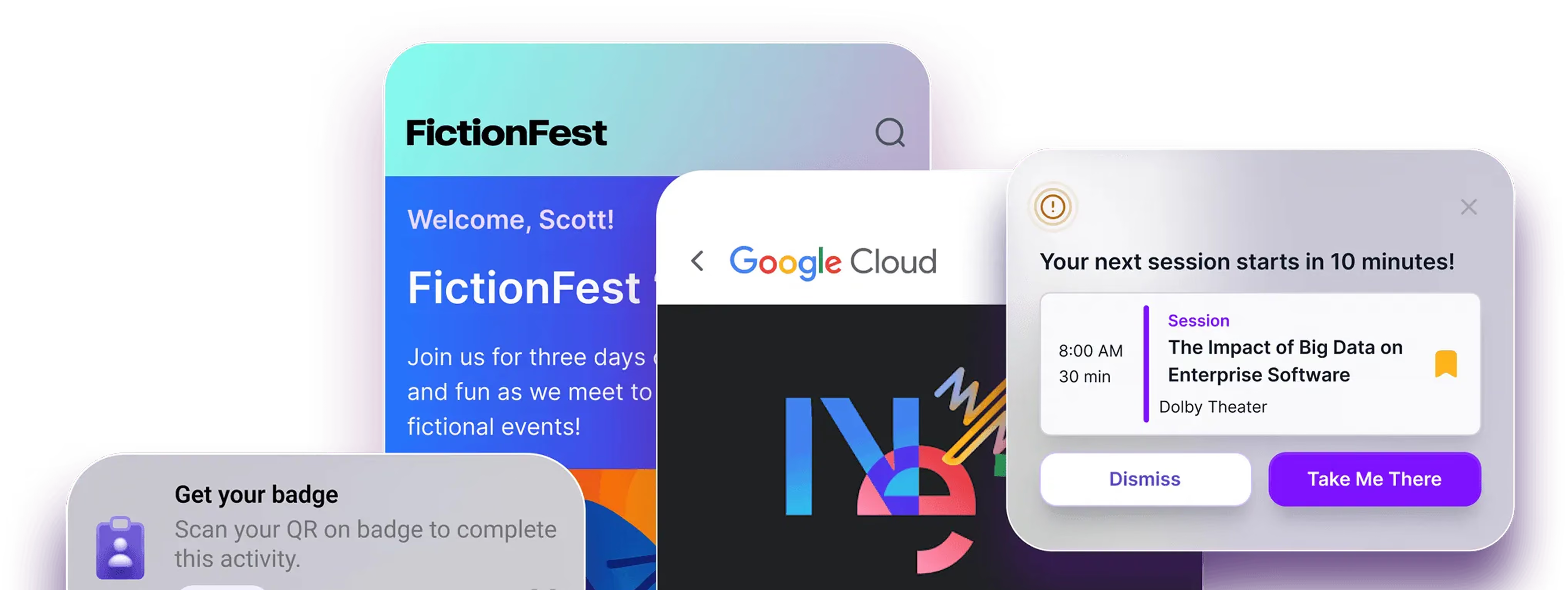
Relevance beats abundance. Look for targeting by role, group, or custom tag so a partner sees different content than an employee. Then look at what the app does proactively. Sidekick, Amego's AI companion, suggests sessions, nudges attendees before things start, and matches people with sponsors based on context. The point of AI in an event app is to reduce the scrolling, so ask any vendor to show you a specific moment where it saves an attendee time.
Networking people will actually use
Almost every app lists "networking" as a feature. Fewer can show you how many attendees used it. Look for attendee profiles, 1:1 chat, and meeting booking, then ask for real usage numbers from events of your size. Our networking features are built around turning hallway conversations into booked meetings, but the test is the same for every vendor: what share of attendees took part?
Sponsor and exhibitor value
Sponsors renew on lead quality. If your app can't give exhibitors a simple way to capture and qualify leads, you'll hear about it in the post-event survey. Ask whether lead scanning is built into the same app attendees already have, whether sponsors get performance reporting, and whether you can offer placements and interactive challenges as paid inventory.
Security and compliance you can verify
Your IT team will ask. Look for SOC 2 Type II and GDPR compliance, then ask to see the evidence instead of a badge on a website. Encryption, monitoring, and role-based access control should be easy to explain. Amego publishes its approach on its security and compliance page, and any vendor you shortlist should be able to do the same.
Integrations that sync instead of export
If your registration data arrives as a CSV on the morning of day one, something will break. Ask how the app connects to your registration platform and CRM, how often data syncs, and what happens when someone changes their registration mid-event.
Engagement you can measure
Adoption is the number that tells you whether the app worked. The formula is simple: active users divided by registered attendees. Count someone as active only if they used at least one core feature, not just downloaded the app. Across Amego customer events, multi-day conferences typically land between 80% and 92%, and we break down the numbers in our event app adoption rate benchmarks. Those figures come from our own platform data, so treat them as a reference point and ask every vendor for theirs.
Gamification can help here. Quest, Amego's event gamification feature, rewards attendees for session attendance, booth visits, and challenges completed in the app, which gives sponsors a reason to send people to their booth too.
Support when it's showtime
You will need a human at some point during the event. Ask who answers, how fast, and whether onsite support is included. Support is also the easiest thing to check before you sign. Read recent customer reviews and call a reference.
A Simple Conference App Scorecard
Use this table to score each vendor during demos. It keeps the conversation on what you need and makes it easier to compare notes with your team afterward.
Questions to Ask Before You Sign
A good demo shows you the product. A good question shows you the company. Bring these to every call:
- Can you show me this running at an event with a similar attendee count and agenda?
- What was the adoption rate at your last three conferences our size, and how was it measured?
- Who on my team can edit content and send notifications, and what can they do without your help?
- How does the app sync with our registration platform and CRM, and what happens when data changes mid-event?
- What does your security documentation include, and can my IT team review it before we sign?
- How do sponsors capture and export leads, and what do they see afterward?
- What support do we get onsite, and what does the first-response time look like during the event?
- Can I talk to a customer who runs events like ours?
Pay attention to how specific the answers are. People who've run big events give you names, numbers, and stories. People who haven't give you adjectives.
Mistakes That Sink Conference App Rollouts
Choosing on feature count. The app with the longest list usually has the most settings to configure and the most screens nobody opens. Pick the one that does your top priorities well.
Having no adoption plan. The best app in the world fails if attendees don't know it exists. Plan the promotion before launch: pre-event emails, signage, a reason to open it on day one, and speakers who point to it from the stage. As a rule of thumb, adoption under 50% usually points to a promotion problem, not a product problem.
Treating the app as a digital program guide. If it only holds the agenda, attendees will use it once and go back to the printed schedule. Use it for the things that change: room updates, session reminders, polls, surveys, and introductions.
Bringing sponsors in late. Exhibitors decide whether to renew based on what they got from the app. Show them lead capture, placements, and reporting during the sales process, not two weeks before the event.
Judging the demo on the vendor's data. Ask for a sandbox loaded with a sample of your agenda, or at least a walkthrough of a conference like yours. Polished demo content hides a lot.
How Amego Fits Large Conferences
Amego was founded in 2021 by Scott Owens after years of running event tech at large enterprises and getting frustrated with legacy apps. The company's whole approach is built by event pros, for event pros, and it shows in how the product handles a big, messy, fast-changing conference.
The Amego mobile event app is a fully branded native app for iOS and Android. Your logo, colors, fonts, and screens carry through the whole experience, including sponsor placements. Organizers manage everything in Amego Admin, so content updates and notifications go out in real time without a developer.
For attendees, Sidekick personalizes the agenda, recommends sessions, and nudges people at the right moment. Built-in networking covers profiles, chat, and meeting booking. Quest gives people a reason to visit booths and sessions, and sponsors get lead scanning, placements, and performance tracking in the same app. Content can be targeted by role, group, or tag, and built-in localization lets attendees read the app in their preferred language. The platform connects with registration platforms and CRM systems, and it is SOC 2 Type II and GDPR compliant.
The results show up in customer events. Cloudflare reached 98% adoption across its global events after unifying its event experience on Amego. Atlassian scaled to more than 20 global events and saw 10x survey responses, which you can read about in the Atlassian success story. Atlassian's own Sr. Event Strategist, Lauren Wolf, calls Amego their "Goldilocks solution," which is the best description of the fit we've heard: flexible enough to customize, structured enough to run at enterprise scale.
Amego has also been recognized on G2 for Best Support and as a High Performer, which comes straight from customer reviews. If you want to see how it would work for your conference, you can book a demo. It takes about 30 minutes, and we'll use your event as the example.
FAQ
What is the best event app for a large conference?
The best conference app is the one that fits your event size, brand, security requirements, and sponsor program. For large enterprise conferences, prioritize full branding control, real-time content management, personalization, built-in lead scanning, and verified security compliance. Our guide to the best event apps for conferences and corporate events compares the main options.
How much does a conference event app cost?
Pricing usually depends on attendee volume and the features you add. Amego's paid plans start at $2,499 per year and scale with attendee volume. You can see current plans on the Amego pricing page.
How far in advance should we choose a conference app?
For a large conference, start the search three to four months before the event at the latest. That leaves room for demos, a security review, branding, integrations with registration and your CRM, and a content load, without a scramble in the final weeks. Earlier is better if you need legal or procurement approval.
What adoption rate should we expect from a conference app?
On Amego, multi-day global conferences typically see 80–92% adoption, and internal events such as sales kickoffs often reach 90% or higher. These numbers come from Amego's own platform data and depend on how much you promote the app. Under 50% usually means attendees didn't know about the app or didn't see a reason to open it.
What security should a conference app have?
At a minimum, look for SOC 2 Type II and GDPR compliance, encryption, monitoring, and role-based access control. Ask for documentation and give your IT team time to review it before you sign.
Should we build a custom conference app or buy one?
Most event teams are better off buying. A custom build means paying for iOS and Android development, content tools, networking, lead capture, and ongoing support, usually on a timeline tighter than the event calendar allows. A configurable platform with real branding control gets you most of the benefit without the maintenance.
The Short Version
Write a one-page brief. Score every vendor against the same criteria. Ask for real numbers, real references, and real security documentation. Then plan how attendees will find out the app exists.
The right conference app is the one your team can change at 6 a.m. and your attendees open without being told to. If you're comparing options for an upcoming event, schedule a demo with Amego and see how it handles a conference like yours.

Sign up for our newsletter
Get insights delivered to your email.